The portrait workshop
Portrait camera angles: change the viewpoint with purpose
PublicSelf editorial · Published
The direction you turn and the height of the camera are separate choices. A three-quarter portrait can be photographed at eye level, from above or from below. Learn to describe those choices before changing the whole pose.
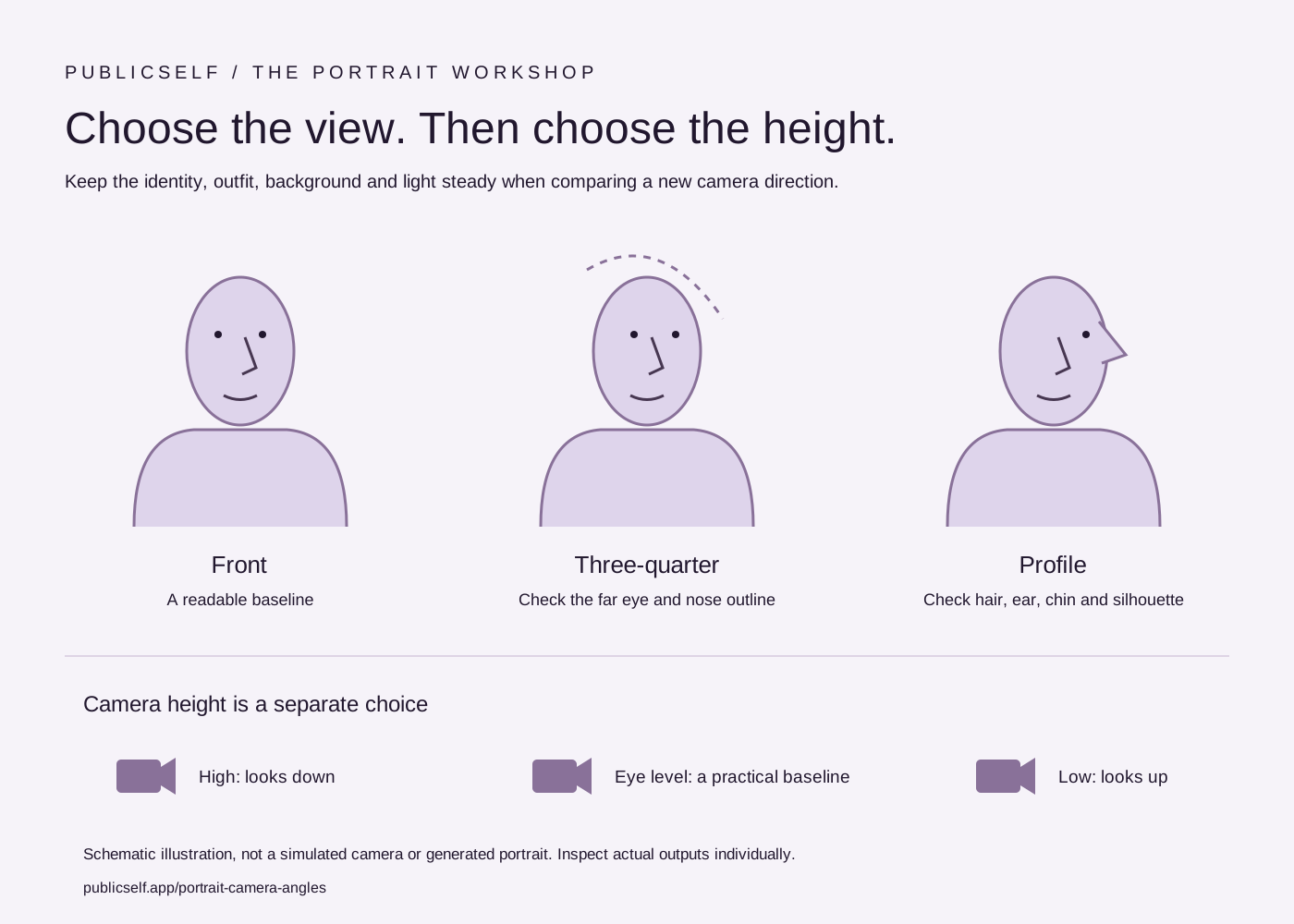
Use the diagram to separate view from height, then build one deliberate variation of a portrait. The illustration shows the setup, while a generated output still needs its own likeness and detail check.
Read the guide ↓
Separate the view from camera height
A front view faces the camera directly. A three-quarter view turns the face enough to show one side more than the other. A profile emphasizes the side outline. These choices describe the relationship between subject and camera around the person, rather than where the camera sits vertically.
Eye level is a practical starting point for an approachable profile image. A higher position looks downward; a lower position looks upward. Move one axis first. If the view, height and expression change together, you are comparing several decisions at once.
View
Camera height
Choose the angle for the image’s job
For a small professional profile, prioritize readable eyes and a recognizable face. Begin with a front or gentle three-quarter view at eye level. For editorial work, a stronger profile or lower viewpoint can give the frame a more deliberate attitude. Neither choice is automatically better.
A very high or low viewpoint can change the apparent proportions of the face and body. Judge whether that effect helps the brief. If the purpose is documenting your everyday appearance, a restrained view is easier to compare with your references.
| Direction | A useful starting use | What to inspect |
|---|---|---|
| Front · eye level | Profile or press portrait | Symmetry, readable eyes and expression |
| Three-quarter · eye level | Personal branding or an outfit portrait | Far eye, nose outline and shoulder position |
| Profile | Editorial silhouette or a side study | Hairline, nose, chin and ear |
| High or low camera | A deliberate editorial variation | Proportion changes and unwanted distortion |
Keep framing and distance deliberate
A camera angle does not determine the crop. You can make a close-up, waist-up or full-length photograph from a similar viewpoint. Keep enough room around hands and head so the final crop has choices. A tight frame can turn a minor hand or garment error into the most visible part of the image.
When testing an angle, keep the outfit, background and light similar to the baseline. Write a short brief such as “three-quarter view, eye level, waist up, calm expression.” In the studio, review the matching controls rather than relying on a long paragraph of competing pose instructions.
- Inspect the far eye and the shape of the nose in a three-quarter view.
- Check ears, hair and jaw in profile.
- Review both the full frame and its final small crop.
Try this direction in PublicSelf
Begin with a saved identity and a Look you are happy to use. Make a baseline Shot with a simple background and readable light, then change one photographic choice. Keep the baseline beside the new output so that you can see the effect of your instruction.
The studio exposes camera view, height and framing separately from pose, expression, background and lighting. These are directions for a generated image, not measurements from a physical camera. A lens label describes a photographic feeling; it does not establish how a real lens was used.
Before you keep the photograph
- Compare the face and hair with your reference photos.
- Inspect the eyes, hands, clothing edges and background at full size.
- Check the crop at its intended profile, website or post size.
- Download useful files or heart them before unsaved images are cleared.
Questions about choosing your photos
Does the diagram generate a photo?
No. It is an interactive explanation of a photographic choice. Open the studio to apply your direction to your own identity and Look. Generating an image uses the credits shown there.
How much does a first image cost?
A free account starts with 10 credits. A picture costs 2 credits and the premium engine 9. Review the selected tier and the total for a Shot or Set before generating. A credit allowance is not a promise of a particular number of usable results.
Can I keep my identity and outfit while changing the photograph?
Your saved identity and Look provide a reusable starting point. Change one shoot choice at a time and inspect the whole result. Likeness, fabric details and composition can vary between generated images.
Sources and further reading
- Nikon — Composing Photographs
Background reading about real photography. The PublicSelf workflow and diagrams are our own editorial material.